
Microsoft brings customizable start menu size to Windows 11
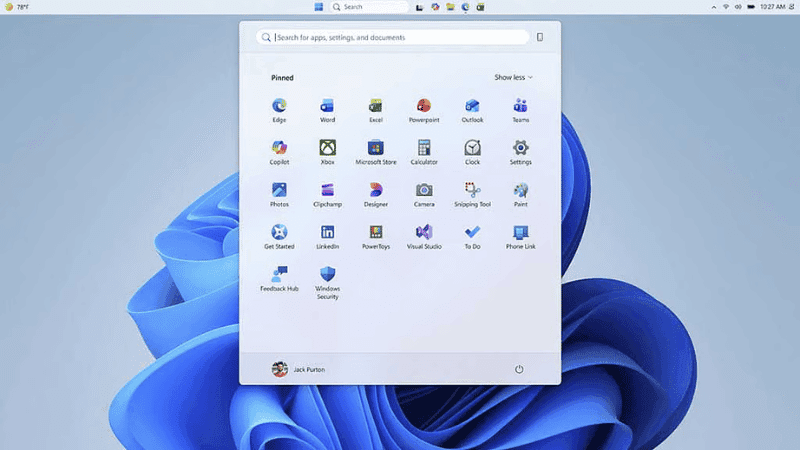

Microsoft has started testing a major change to allow users to customize the Start menu and taskbar in Windows 11. The company is rolling out these updates to Windows Insiders in the ‘Experimental’ channel by next week.
The new update will have two size options for the Start menu — ‘Small’ and ‘Large’. If you choose the preferred size from the Start menu settings, it will be set the same on all displays. Microsoft is making this change mainly in response to user complaints after the Windows 11 Start menu almost doubled in size after an update in November last year.
In addition, the ‘Pinned’, ‘Recommendations’ and ‘All’ sections of the Start menu will also be able to be turned on or off separately. As a result, someone can keep only their pinned apps and hide all the rest. Separate controls are also being added for file recommendations. The option to hide your name and profile picture from the Start menu is also being added to protect privacy while sharing your screen or live streaming.
The taskbar is also getting a big change. From now on, the taskbar can be moved to any edge of the screen — top, bottom, right, or left. If you place the taskbar on the right or left, the user can also choose whether the icons will be at the top or in the middle. If you place it on the top or bottom, you will have the option to place the icons on the left or in the middle.
To join Microsoft's Windows Insider program, you will need to register with your Microsoft account. Insiders get the opportunity to use the latest Windows version under test first and provide feedback, which is later used to improve the features before they are launched for everyone.
Leave A Comment